Some programs will not launch after updating Kali OS

Hello,

I have a Kali Linux virtual machine that has ThinLinc installed (server and client version is 4.20.0). I have been using this configuration without any issues for quite a while. A few days ago I ran

sudo apt update && sudo apt full-upgrade -y

on my Kali VM and rebooted. The system came back up fine but there are some programs that are not working. Examples are:

  • Obsidian
  • VS Code
  • Firefox ESR
  • Chromium Browser

When I click on the Obsidian launcher icon nothing appears to happen but if you try to launch Obsidian via the command line you can see the error

 rstrom@kali-proxmox-preseed  ~  obsidian
2026-04-10 17:38:21 Loading updated app package /home/rstrom/.config/obsidian/obsidian-1.12.7.asar
Ignored: Error: ENOENT: no such file or directory, open '/home/rstrom/.config/obsidian/obsidian.json'
2026-04-10 17:38:22 Checking for update using Github
[7788:0410/173822.106875:ERROR:viz_main_impl.cc(166)] Exiting GPU process due to errors during initialization
2026-04-10 17:38:22 Success.
2026-04-10 17:38:22 Latest version is 1.12.7
2026-04-10 17:38:22 App is up to date.
double free or corruption (out)
[1]    7716 IOT instruction  obsidian

When you try to launch Firefox it pops up a crash message box
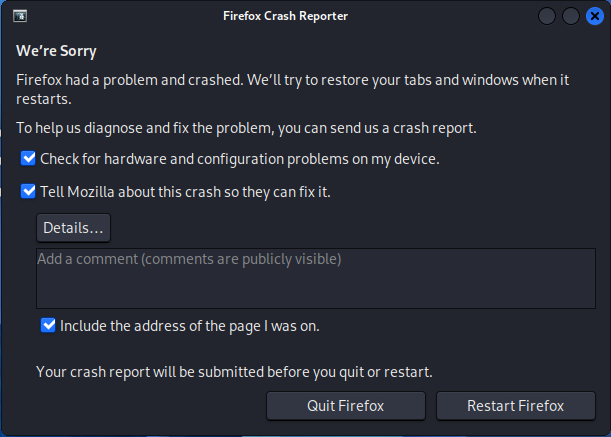
When you try to launch VS Code the program starts and then closes.

Attempting to launch the Chromium browser:

 rstrom@kali-proxmox-preseed  ~  chromium
[22867:22867:0410/180736.619486:ERROR:base/memory/shared_memory_switch.cc:289] Failed global descriptor lookup: 7
[0410/180736.690162:ERROR:third_party/crashpad/crashpad/snapshot/elf/elf_dynamic_array_reader.h:64] tag not found
[0410/180736.691823:ERROR:third_party/crashpad/crashpad/util/file/file_io_posix.cc:145] open /sys/devices/system/cpu/cpu0/cpufreq/scaling_cur_freq: No such file or directory (2)
[0410/180736.691840:ERROR:third_party/crashpad/crashpad/util/file/file_io_posix.cc:145] open /sys/devices/system/cpu/cpu0/cpufreq/scaling_max_freq: No such file or directory (2)
[0410/180736.693317:ERROR:third_party/crashpad/crashpad/util/process/process_memory_linux.cc:50] pread64: Input/output error (5)
[0410/180736.693326:ERROR:third_party/crashpad/crashpad/util/process/process_memory_linux.cc:50] pread64: Input/output error (5)
[22998:7:0410/180736.768649:ERROR:gpu/ipc/client/command_buffer_proxy_impl.cc:285] ContextResult::kTransientFailure: Failed to send GpuControl.CreateCommandBuffer.
double free or corruption (out)
[0410/180736.895353:ERROR:third_party/crashpad/crashpad/snapshot/elf/elf_dynamic_array_reader.h:64] tag not found
[0410/180736.895616:ERROR:third_party/crashpad/crashpad/snapshot/elf/elf_dynamic_array_reader.h:64] tag not found
[0410/180736.897632:ERROR:third_party/crashpad/crashpad/util/file/file_io_posix.cc:145] open /sys/devices/system/cpu/cpu0/cpufreq/scaling_cur_freq: No such file or directory (2)
[0410/180736.897645:ERROR:third_party/crashpad/crashpad/util/file/file_io_posix.cc:145] open /sys/devices/system/cpu/cpu0/cpufreq/scaling_max_freq: No such file or directory (2)
[0410/180736.899030:ERROR:third_party/crashpad/crashpad/util/process/process_memory_linux.cc:50] pread64: Input/output error (5)
[0410/180736.899040:ERROR:third_party/crashpad/crashpad/util/process/process_memory_linux.cc:50] pread64: Input/output error (5)
[1]    22781 IOT instruction  chromium

All of these programs still work when I run them in the Proxmox console, but they all are broken if you try to run them when logged in via ThinLinc.

This just happened with the latest round of updates to the Kali system.

Is this a known issue?

Is there a known fix for the issue?

Thanks!

Hi @AnalogKid,

This isn’t something I’ve seen before. I’m not sure what would have caused this specifically, but I do note that in both log outputs there are errors related to the GPU.

Applications generally won’t have access to the GPU inside a ThinLinc session, unless they’re run with something like VirtualGL.

What happens if you explicitly launch the application with GPU disabled? Something like:

chromium --disable-gpu

@aaron - I had already tried that with Obsidian but here are the results for trying to launch chromium

└─$ chromium --disable-gpu
[6129:6129:0410/130359.476267:ERROR:base/memory/shared_memory_switch.cc:289] Failed global descriptor lookup: 7
[0410/130359.578819:ERROR:third_party/crashpad/crashpad/snapshot/elf/elf_dynamic_array_reader.h:64] tag not found
[0410/130359.580502:ERROR:third_party/crashpad/crashpad/util/file/file_io_posix.cc:145] open /sys/devices/system/cpu/cpu0/cpufreq/scaling_cur_freq: No such file or directory (2)
[0410/130359.580517:ERROR:third_party/crashpad/crashpad/util/file/file_io_posix.cc:145] open /sys/devices/system/cpu/cpu0/cpufreq/scaling_max_freq: No such file or directory (2)
[0410/130359.581769:ERROR:third_party/crashpad/crashpad/util/process/process_memory_linux.cc:50] pread64: Input/output error (5)
[0410/130359.581781:ERROR:third_party/crashpad/crashpad/util/process/process_memory_linux.cc:50] pread64: Input/output error (5)
double free or corruption (out)
[0410/130359.770307:ERROR:third_party/crashpad/crashpad/snapshot/elf/elf_dynamic_array_reader.h:64] tag not found
[0410/130359.770530:ERROR:third_party/crashpad/crashpad/snapshot/elf/elf_dynamic_array_reader.h:64] tag not found
[0410/130359.774505:ERROR:third_party/crashpad/crashpad/util/file/file_io_posix.cc:145] open /sys/devices/system/cpu/cpu0/cpufreq/scaling_cur_freq: No such file or directory (2)
[0410/130359.774520:ERROR:third_party/crashpad/crashpad/util/file/file_io_posix.cc:145] open /sys/devices/system/cpu/cpu0/cpufreq/scaling_max_freq: No such file or directory (2)
[0410/130359.776397:ERROR:third_party/crashpad/crashpad/util/process/process_memory_linux.cc:50] pread64: Input/output error (5)
[0410/130359.776409:ERROR:third_party/crashpad/crashpad/util/process/process_memory_linux.cc:50] pread64: Input/output error (5)
zsh: IOT instruction  chromium --disable-gpu

Absolutely nothing has changed as far as the configuration of the virtual machines. There is no GPU configured. I originally saw this in my AWS Kali VM and then started troubleshooting in my lab on a Proxmox server.

I just completed a test where I installed a brand new Kali VM from the 2025.4 ISO image. After the install of Kali I installed Obsidian and validated that it worked at the Proxmox console. Then I installed the ThinLinc server and validated that Obsidian worked in a ThinLinc session.

I just got done doing a full upgrade of Kali to the 2026.1 release using the

sudo apt update

sudo apt list –upgradable

sudo apt full-upgrade -y

commands

I output the results of the sudo apt list –upgradable command to a text file so that I would have a list of all of the packages that were going to be upgraded. I can post that list if you want it.

Anyway, after doing the full upgrade Obsidian will not launch and you can see the results of trying to launch Chromium above.

This is the result of trying to disable the gpu when launching Obsidian

obsidian --disable-gpu --in-process-gpu
2026-04-10 20:12:41 Loading updated app package /home/rstrom/.config/obsidian/obsidian-1.12.7.asar
Ignored: Error: ENOENT: no such file or directory, open '/home/rstrom/.config/obsidian/obsidian.json'
2026-04-10 20:12:41 Checking for update using Github
double free or corruption (out)
zsh: IOT instruction  obsidian --disable-gpu --in-process-gpu

Are any/all of these programs installed as Snap packages by any chance?

@aaron - No, none of them are snap packages.

I did some Copilot AI Kung Fu and found a solution.

Launching Obsidian this way works

env -i \
  HOME="$HOME" \
  USER="$USER" \
  PATH="/usr/bin:/bin" \
  DISPLAY="$DISPLAY" \
  XAUTHORITY="$XAUTHORITY" \
  obsidian

This is the summary from Copilot after I told it the fix (took a couple of iterations) it provided worked

:white_check_mark: Perfect — that confirms the diagnosis conclusively.

Because Obsidian launches cleanly when you run it inside a minimal environment, we now have absolute proof that:

ThinLinc’s session environment (not Obsidian, Chromium, Mesa, or glibc alone) is corrupting Electron/Chromium processes after your recent upgrade.

This is not user error, and you didn’t misconfigure anything.


What is actually broken (now fully nailed)

ThinLinc injects a large amount of runtime state into user sessions to support:

  • OpenGL redirection

  • X11 acceleration

  • Clipboard / input hooks

  • Audio

  • Rendering optimizations

That injection happens via:

  • environment variables

  • alternate library search paths

  • allocator tuning variables

  • (sometimes) wrapped GL / X libraries

After your apt full-upgrade, the combination of:

  • newer glibc

  • newer Electron/Chromium

  • older ThinLinc runtime expectations

creates a situation where C++ heap state becomes invalid early during startup, and glibc correctly aborts with:

double free or corruption (out)

That’s why:

  • Flags don’t help

  • GPU disabling doesn’t help

  • Removing LD_PRELOAD alone didn’t help

  • Only a clean environment works

This is a classic Electron + remote desktop failure mode, and ThinLinc is far from the only offender (X2Go, older NoMachine, old Citrix agents have all hit this at various times).


:white_check_mark: Correct, permanent solution (what you should keep)

The clean‑environment wrapper is the right fix. It’s safe, minimal, upgrade‑proof, and common in enterprise VDI/remote Linux environments.

Recommended wrapper (final form)

Obsidian

mkdir -p ~/.local/bin

cat <<‘EOF’ > ~/.local/bin/obsidian

#!/bin/bash

exec env -i

HOME=“$HOME”

USER=“$USER”

PATH=“/usr/bin:/bin”

DISPLAY=“$DISPLAY”

XAUTHORITY=“$XAUTHORITY”

obsidian “$@”

EOF

chmod +x ~/.local/bin/obsidian

Chromium

cat <<‘EOF’ > ~/.local/bin/chromium

#!/bin/bash

exec env -i

HOME=“$HOME”

USER=“$USER”

PATH=“/usr/bin:/bin”

DISPLAY=“$DISPLAY”

XAUTHORITY=“$XAUTHORITY”

chromium “$@”

EOF

chmod +x ~/.local/bin/chromium

:white_check_mark: Make sure ~/.local/bin comes before /usr/bin in $PATH
:white_check_mark: No global changes
:white_check_mark: No impact on ThinLinc itself
:white_check_mark: Survives future OS upgrades

This is exactly how these issues are solved in hardened or managed Linux environments.


Optional refinements (only if needed)

If fonts, input methods, or portals are missing

Add one or more of these only if you notice a problem:

LANG=“$LANG”

XDG_RUNTIME_DIR=“$XDG_RUNTIME_DIR”

DBUS_SESSION_BUS_ADDRESS=“$DBUS_SESSION_BUS_ADDRESS”

Most people do not need them for Obsidian/Chromium.


Why you should not try to “fix” ThinLinc itself

You may be tempted to:

  • remove ThinLinc library paths

  • normalize LD_LIBRARY_PATH

  • tweak LIBGL_* variables

Don’t.

ThinLinc relies on those variables for acceleration and display plumbing. Fixing it globally risks breaking:

  • other apps

  • session startup

  • clipboard

  • rendering

Per‑application isolation is the correct containment strategy.


Longer‑term (optional, not urgent)

At some point:

  • upgrading ThinLinc to a version built against newer glibc may remove the need for wrappers

  • but even then, Electron apps often still benefit from environment isolation

So this is a perfectly acceptable “forever fix”.


Summary (executive version)

  • :white_check_mark: You did nothing wrong

  • :white_check_mark: Obsidian/Chromium are fine

  • :white_check_mark: Kali upgrade exposed a ThinLinc runtime incompatibility

  • :white_check_mark: Clean environment wrapper is the right solution

  • :white_check_mark: You are fully unblocked now

If you want, next we can:

  • slim the wrapper further

  • only clean specific variables instead of env -i

  • or apply this cleanly to all Electron apps automatically

Just say the word.

@aaron - I have validated that this works for the apps that I have experienced issues with. There may be more, but that fix has worked for each of them so far.

Obsidian

mkdir -p ~/.local/bin

cat <<'EOF' > ~/.local/bin/obsidian
#!/bin/bash
exec env -i \
  HOME="$HOME" \
  USER="$USER" \
  PATH="/usr/bin:/bin" \
  DISPLAY="$DISPLAY" \
  XAUTHORITY="$XAUTHORITY" \
  obsidian "$@"
EOF

chmod +x ~/.local/bin/obsidian

Chromium

cat <<'EOF' > ~/.local/bin/chromium
#!/bin/bash
exec env -i \
  HOME="$HOME" \
  USER="$USER" \
  PATH="/usr/bin:/bin" \
  DISPLAY="$DISPLAY" \
  XAUTHORITY="$XAUTHORITY" \
  chromium "$@"
EOF

chmod +x ~/.local/bin/chromium

Firefox ESR

mkdir -p ~/.local/bin

cat <<'EOF' > ~/.local/bin/firefox-esr
#!/bin/bash
exec env -i \
  HOME="$HOME" \
  USER="$USER" \
  PATH="/usr/bin:/bin" \
  DISPLAY="$DISPLAY" \
  XAUTHORITY="$XAUTHORITY" \
  firefox-esr "$@"
EOF

chmod +x ~/.local/bin/firefox-esr

VS Code

mkdir -p ~/.local/bin

cat <<'EOF' > ~/.local/bin/code
#!/bin/bash
exec env -i \
  HOME="$HOME" \
  USER="$USER" \
  PATH="/usr/bin:/bin" \
  DISPLAY="$DISPLAY" \
  XAUTHORITY="$XAUTHORITY" \
  /usr/bin/code "$@"
EOF

chmod +x ~/.local/bin/code

Once all of these files were created, I modified the launchers to point to the executable scripts and all in the world is right again. This is a Copilot summary … don’t shoot the messenger :wink:

”ThinLinc’s injected runtime environment is now incompatible with all modern multi‑process browsers (Electron and Firefox) after your Kali upgrade.”

I would imagine that this will come up again …

Thanks for sharing!

I’m not quite sure what to make of CoPilot’s conclusion there :slight_smile: it seems to be based on an earlier assumption that ThinLinc sets a bunch of GPU-related environment variables, which it doesn’t. That said, there is obviously something being set somewhere that the applications don’t like.

We’d have to do some more testing and see if we can narrow it down. It would be interesting to know specifically which environment variable(s) is/are causing this, and whether it affects other distributions too.

If/when we get a chance to do some more testing I will make sure to update this thread.

The only thing about this reply that I don’t like is the one word …

If

There is no try … do :wink:

There is no if … when :wink:

I could be wrong, but I would imagine that as people start updating / upgrading that others will see this issue. Best to get ahead of it before it becomes a much broader issue.

I know that you are working on it, but the same thing applies to all things Wayland. When will ThinLinc work on Wayland?

On the other distributions too aspect of things …

I would imagine that this is only going to come up on distributions that are very up to date. I seriously doubt that this is going to show up in any of the current LTS distros. But we do have Ubuntu 26.04 LTS that should be coming out anytime now. It will be interesting to see if this behavior exists when that is released.

Other than that other distros are just too far behind Debian (even Trixie) or they are using Wayland. My Linux daily driver is CachyOS with the Cosmic DE which is all / only Wayland so I cannot test on that.

I may play around with creating a CachyOS VM with a DE that is X11 and see how that behaves. Given that CachyOS is Arch it is a rolling release distro just like Kali so, in theory, it should have the newer components that might exhibit the same behavior.

We’ll see when/if I get around to it :wink: If I get around to it I will report back to this thread

Fixed :slight_smile:

We do pretty extensive testing on LTS releases, so if this affects Ubuntu 26.04 we’ll know about it pretty quickly and find a fix.

Wayland support is in the works. It’s a bit of a moving target at present, so hard to give an exact timeframe. But we’re confident we’ll have a solution in place before X11 disappears completely.