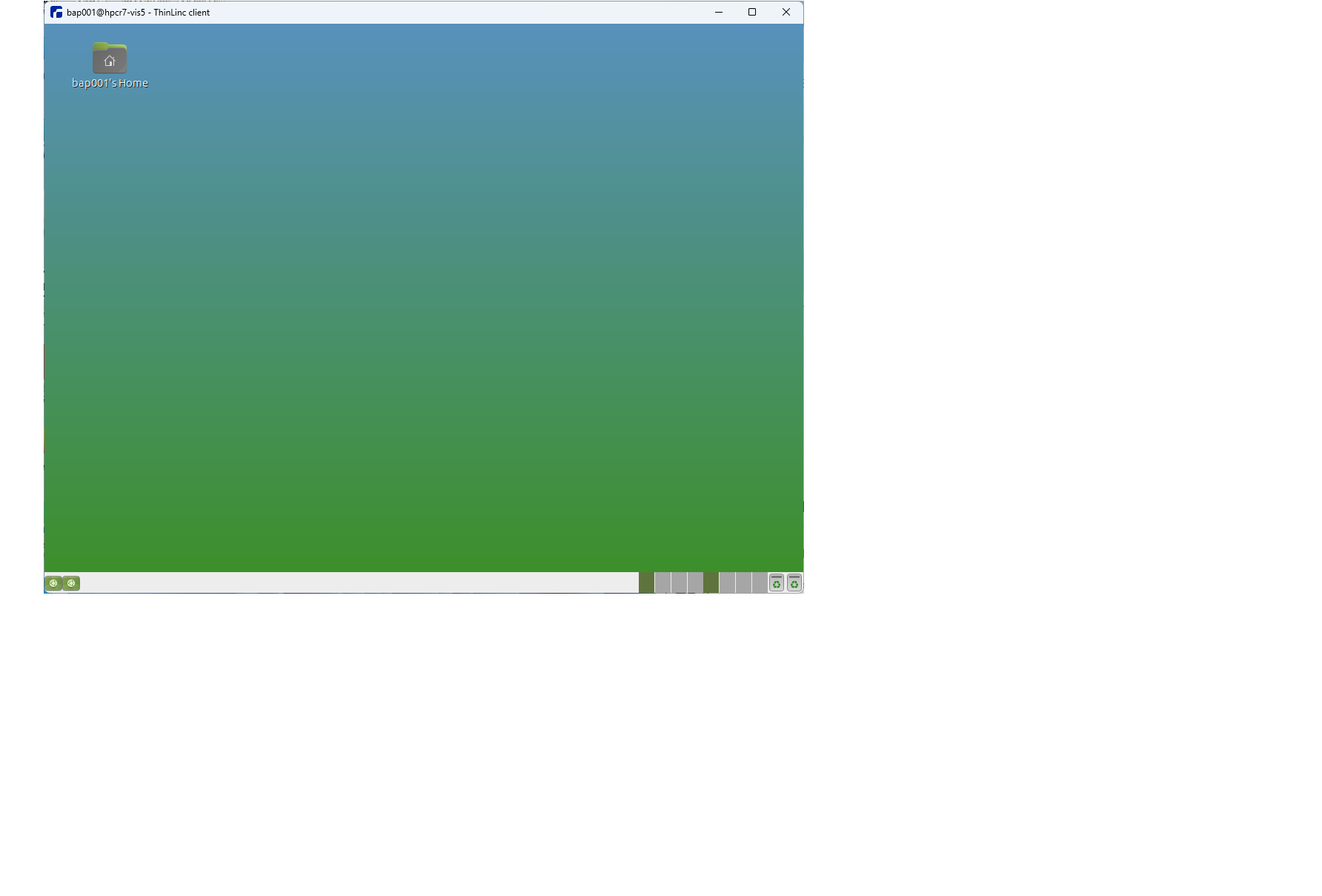
I am using thinlinc client (v1.20), to connect linux box(ubuntu 24 container) running ThinLinc server software. I am using Mate desktop to login. It was working before, but suddenly, I don’t see main icon (button on top left). I tried connecting/disconnecting; ending previous sessions etc.
Any idea? Thanks for help.
-also do you know, what directories/files ThinLinc creates for housekeeping on laptop and Linux machine. I need to know, if by removing those directories/files may help.
Your desktop configuration is handled entirely by MATE, rather than ThinLinc. So unfortunately I’m not too sure what’s happening in the screenshot above, or what might have caused it. You could try resetting your configuration by deleting/moving the ~/.config/mate folder, and creating a new session. Does that help?
mv ~/.config/mate to some other name did not help.
I also renamed ~/.Xauthority, ~/.config/konsolerc, ~/.local/share/konsole ..no help
During this testing, I see that on Welcome to ThincLinc screen, choosing profile, then spinning wheel gets stuck at 6 out of 12. …may not be loading all components.
Any more suggestion?
Have you tried creating a new user, and connecting via ThinLinc with this account? That would at least tell us whether this is a user-specific or system-wide issue.
Another place to check would be the session log file on the agent server, which you can find here:
I canot create new user as I am ordinary user on the system. I looked at xinit.log file, that has some interesting lines. Is it a system issue or my thinlinc client setup?
> Warning:          Could not resolve keysym XF86NavInfo
Errors from xkbcomp are not fatal to the X server
..
libEGL warning: DRI3 error: Could not get DRI3 device
libEGL warning: Ensure your X server supports DRI3 to get accelerated rendering
mate-session-check-accelerated: GLES Helper exited with code 512
** Message: 12:56:00.753: couldn't access control socket: /run/user/66193/keyring/control: No such file or directory
discover_other_daemon: 0mate-session[15253]: WARNING: Could not connect to Systemd: Failed to connect to socket /run/dbus/system_bus_socket: No such file or directory
mate-session[15253]: WARNING: Could not connect to Systemd: Failed to connect to socket /run/dbus/system_bus_socket: No such file or directory
SSH_AUTH_SOCK=/run/user/66193/keyring/ssh
mate-session[15253]: WARNING: Unable to find provider '' of required component 'dock'
...
05/20/26 12:56:01: Dock is not set in dconf, doing nothing.
[ 05/20/26 12:56:01.585 session_init FATAL ERROR ] Another composite manager is already running
discover_other_daemon: 1SSH_AUTH_SOCK=/run/user/66193/keyring/ssh

(mate-power-manager:15561): PowerManager-WARNING **: 12:56:01.588: Failed to connect to socket /run/dbus/system_bus_socket: No such file or directory
..
(mate-power-manager:15561): PowerManager-ERROR **: 12:56:01.588: This program cannot start until you start the dbus system service.
..
(caja:15515): Gtk-WARNING **: 12:56:01.601: Failed to register client: GDBus.Error:org.gnome.SessionManager.AlreadyRegistered: Unable to register client
..
(polkit-mate-authentication-agent-1:15583): polkit-mate-1-WARNING **: 12:56:01.678: Error getting authority: Error initializing authority: Could not connect: No such file or directory
..
(caja:15515): GLib-GIO-CRITICAL **: 12:56:02.727: file ../../../gio/gfileinfo.c: line 2061 (g_file_info_get_symlink_target): should not be reached

Wed May 20 12:57:02 2026
 VNCSConnST:  Closing 127.0.0.1::23184: Clean disconnection
 EncodeManager: Framebuffer updates: 351
 EncodeManager:   Tight:
 EncodeManager:     Solid: 252 rects, 2.08191 Mpixels
 EncodeManager:            3.9375 KiB (1:2066.14 ratio)
 EncodeManager:     Bitmap RLE: 53 rects, 44.094 kpixels
 EncodeManager:                 1.65039 KiB (1:104.741 ratio)
 EncodeManager:     Indexed RLE: 516 rects, 2.72829 Mpixels
 EncodeManager:                  96.4902 KiB (1:110.513 ratio)
 EncodeManager:   Tight (JPEG):
 EncodeManager:     Full Colour: 559 rects, 3.12893 Mpixels
 EncodeManager:                  2.018 MiB (1:5.91788 ratio)
 EncodeManager:   Total: 1.38 krects, 7.98322 Mpixels
 EncodeManager:          2.11769 MiB (1:14.388 ratio)
 Connections: Closed: 127.0.0.1::23184
E: [tunnel-source] module-tunnel-source-new.c: Stream failed: Connection terminated
E: [tunnel-sink] module-tunnel-sink-new.c: Stream failed.
Thanks for that. It looks like a system issue (i.e. unrelated to ThinLinc), but it’s hard to tell from the logs exactly what the problem is. Have you tried rebooting the server(s)? There might be stray proceesses left over from another session.
Are these containers related to the ThinLinc installation somehow? Or used for something else?