ThinStation 7.2 has dropped the icewm package, which ThinLinc 4.20 seems to require. Will there be a new release of ThinLinc that uses a Window Manager included in ThinStation 7.2?
Hi,
AFAICT, which packages are provided on the ThinStation end-user devices is determined by whoever built the ThinStation image. And the images are built based on Fedora 42, which does have icewm available.
Let me know if I’m misunderstanding something, but from what I can tell ThinLinc should work with ThinStation 7.2, provided it has been built with all the required dependencies.
I am building the ThinStation image(s) using ThinStation 7.2.0, which no longer includes the icewm package. It looks like it was dropped in version 7.0.0, which, I believe was the first Fedora-based release.
@emanley, I see what you mean now. Thanks for the report. I’ve added a bug here:
Actually, I did a quick test building ThinStation with that dependency removed, but the resulting image wouldn’t boot. Are you seeing the same behaviour? If so, there may be more work required.
Once I commented out the fastboot line in my build.conf the image booted fine, but launching thinlinc fails because bin/thinlinc-console tries to start icewm.
Understood. It sounds like we might need to take another look at our packaging of the client for ThinStation 7.x (and corresponding documentation).
I notice that ThinStation provides ThinLinc 4.19.0 out-of-the-box though, which is pretty recent. If you want to use the latest version of ThinLinc, you should be able to update build.urls with the link to the client RPM on the downloads page. Does that work for you?
That works for now. Thank you!
Apparently, that doesn’t work for now. ThinLinc 4.19 works find with ThinStation 6.2.8, but when I try with ThinStation 7.2.0 I get “/etc/init.d/thinlinc: line 120: /opt/thinlinc/bin/thinlinc-console: No such file or directory”
Hi,
ThinLinc 4.19.0 should be the default shipped with the latest ThinStation 7, so you shouldn’t need to do anything there. Did you mean 4.20.0?
Just to clarify, to get ThinLinc 4.20.0 on ThinStation 7.x, you should only need to change the URL in build.urls, nothing else. So you don’t need to copy the ThinStation package as described in the documentation.
OK, I started with a fresh clone of the ThinStation 7.2.0 repo. I verified the ThinLinc 4.19 url in build.urls. I made sure “package thinlinc” was NOT commented out in build.conf. I made no other changes. The build was successful. I booted my ThinStation PC with the resulting image and when I attempt to launch ThinLinc I get the following error": “/etc/init.d/thinlinc: line 120: /opt/thinlinc/bin/thinlinc-console: No such file or directory”.
Strange. I’m not seeing that running on QEMU:
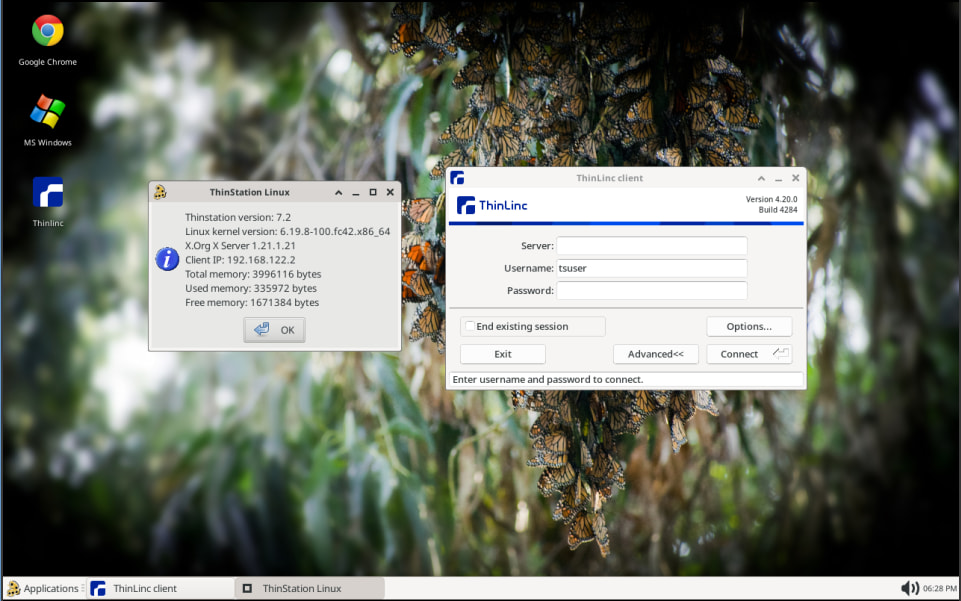
Any reference to thinlinc-console must be a bug in ThinStation, since there’s no such command provided either by ThinStation or the ThinLinc client RPM. Are you sure you haven’t changed anything else in your configuration? Specifically SESSION_<number>_TYPE?
My apologies. You’re absolutely correct. I had SESSION_0_TYPE=thinlinc in thinstation.conf.buildtime. This definitely worked with ThinStation 6.2.8 and thinlinc-console existed and presented users with a thinlinc dialog rather than a desktop. That’s the script that was trying to start icewm, which started this whole mess.
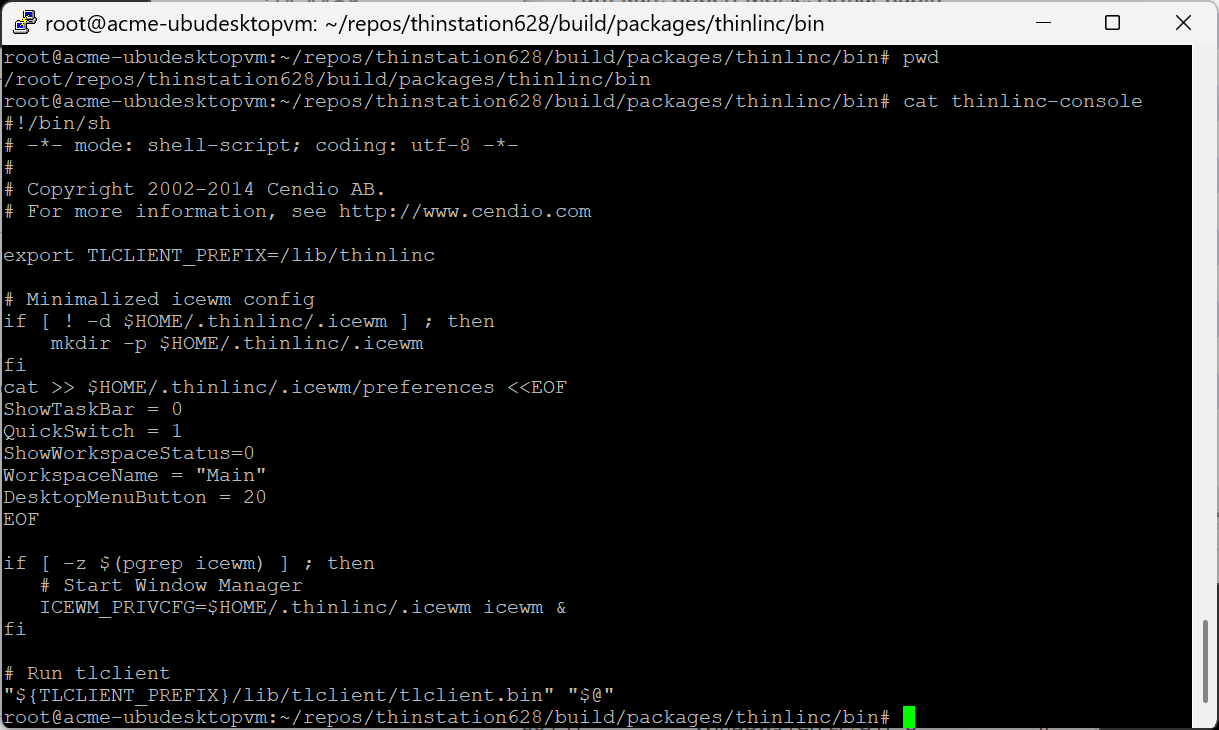
Nice! AFAICT the thinlinc-console command only exists as part of our packaging of the ThinLinc client for ThinStation, which ThinStation doesn’t use anymore (unless you copy it there manually). So references to this ideally should have been removed.
If you’re looking to run ThinLinc in “kiosk” mode (i.e. no desktop) on ThinStation 7, you would have to rewrite thinlinc-console to use xfwm4 instead. If you do decide to do this, and get something working, please feel free to share it in a comment on this post 
In the mean time, we’ll look at how we can better support ThinStation 7 moving forward. Thanks for letting us know!
I was thinking the same thing regarding xfwm4. If I have success I’ll pass it on. Thanks very much for all your help.