I just setup Thinlinc in an attempt to replace my existing setup with 2 windows machines, 1 local, 1 remote and RDP. I desperately want to get away from the windows environment, but i need a stable and fast remote linux desktop in order to maintain my workflow. Thinlinc seems to handle the performance just fine. The remote desktop inteface is smooth and usable. My issue is the multi-monitor setup. I have 5 monitors on my local windows machine. I use 2 of those montiors for my remote machine and the rest for local services and applications. With RDP its simple. I specify which 2 monitors i want for the remote machine and it connects fullscreen with just those 2 montiors. The rest run locally as expected. With Thinlinc it bleeds over into my other monitors.
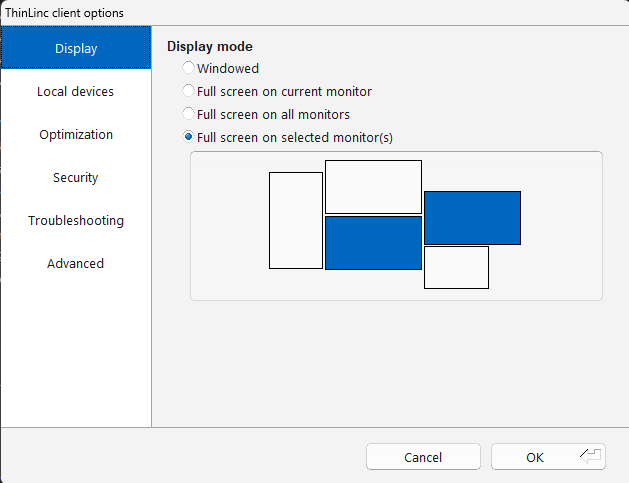
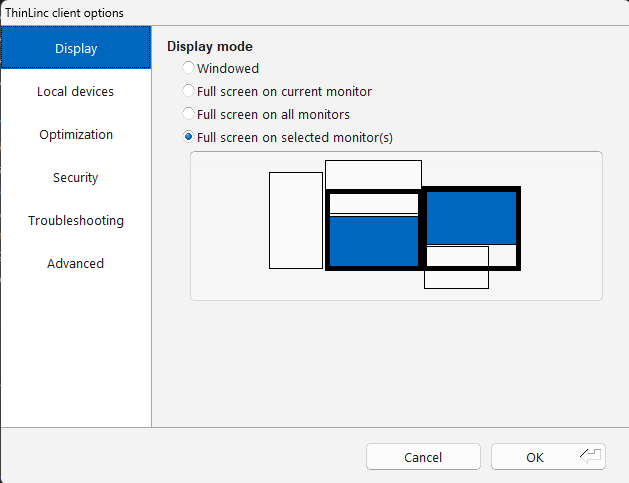
I am attaching 2 screenshots of the Thinlinc client.
The first shows my monitor selection before connecting
The second picture is the actual desktop windows that show up when i connect via the thinlinc client. The black boxes show how the desktop screen bleeds over into my additional monitors.
If there are more advanced settings i can use on the client to tell it to stick to certain monitors, specify resolutions etc i’d like to be pointed in the right direction.
I am running the most recent version of the Thinlinc server and Thinlinc Client. The server is running on mint linux 22.3 and my client runs on windows 11.
Any input is appreciated.