ThinLinc Reverse tunnel connection

Hello,

I have been trying to get a connection using ThinLinc via an SSH reverse tunnel back to a Kali Linux system but I have not been able to get it to work. I have searched for, and found, several previous posts about the topic but I have not been able to translate what I see in those posts into a working configuration.

I can connect back to the Kali Linux system through the reverse tunnel via standard SSH, but am unable to get a connection using the ThinLinc client. I have also been able to create a reverse tunnel back to the Kali Linux system and use the ThinLinc web connection.

The setup:

The remote Kali Linux system that I have is using autossh to create the tunnel to the intermediary Linux system. The command on the Kali Linux system is:

autossh -M 0 -o "ServerAliveInterval 30" -o "ServerAliveCountMax 3" -i /home/<user>/.ssh/<ssh_key> -R 3333:localhost:22 -R 33389:localhost:3389 -R 3300:localhost:300 -o "StrictHostKeyChecking=no" user@intermediary_Linux_system.org -N

Port 3333 tunnels SSH back to the Kali Linux system, port 33389 tunnels back to RDP on port 3389 (XRDP is actually not currently running since I like ThinLinc so much more), port 3300 tunnels back to the ThinLinc web service on port 300.

On my remote system I can create an SSH tunnel connection to the intermediary system using the following command from my remote system:

ssh -qnN -L 3333:127.0.0.1:3333 user@intermediary_Linux_system.org

Then I can SSH to the remote Kali Linux system via the reverse tunnel from my remote system using the following command:

ssh -p 3333 127.0.0.1

I can tunnel to the ThinLinc web connection if I connect from my remote system to the SSH reverse tunnel using this command:

ssh -qnN -L 3300:127.0.0.1:3300 user@intermediary_Linux_system.org

and then connect via a web browser using this URL

http://127.0.0.1:3300

which ends up taking me to the remote ThinLinc web connect @ https://192.168.0.147:300/agent

I have tried many, many iterations of the

HOST_ALIASES=

in the ~/.thinlinc/tlclient.conf file but have never gotten anything to work.

Hopefully someone out there has been able to make something like this work and can help get me pointed in the right direction. What I am missing here?

Thanks very much in advance!

Hi @AnalogKid,

There are a lot of moving parts here, but I think I understand what you’re trying to achieve. I won’t ask why :wink:

Probably the best place to look for clues would be the ThinLinc client log file at ~/.thinlinc/tlclient.log. This should tell you which part of the connection is failing. If you need more verbose debug output, you can start the client from the command line using the -d5 flag.

If it’s not immediately obvious what the problem is then feel free to post the relevant lines from this file, and we’ll try to help.

@aaron - Here are the results of one attempt

~/.thinlinc/tlclient.conf - HOST_ALIASES= config shown below

192.168.0.139 is the internal IP of the remote / from system; 192.168.0.147 is the internal IP of the remote / to system

HOST_ALIASES=192.168.0.139:3333=192.168.0.147:22

Client setup is:

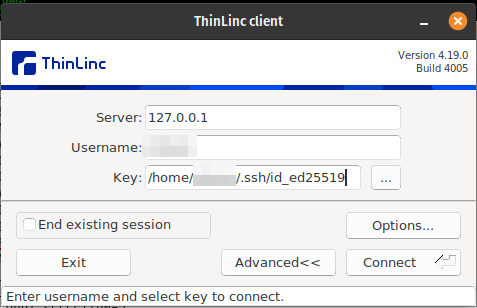
Server: 127.0.0.1

User: user

SSH Key: ssh private key

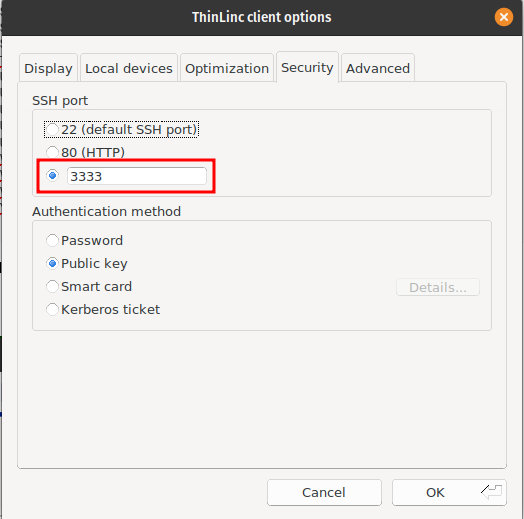
Options > Security > Port: 3333

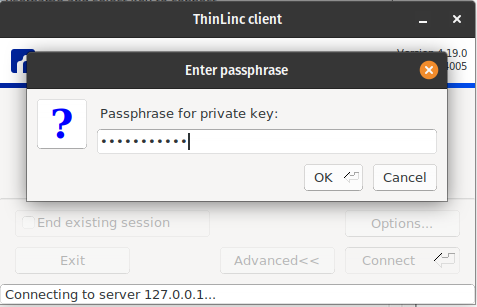
I get prompted for the SSH key password and then get

~/.thinlinc/tlclient.log

└─(08:09:55)──> cat ~/.thinlinc/tlclient.log                                                                                                       ──(Tue,Nov18)─┘
2025-11-18T08:02:31: Log file created for ThinLinc client running on process 725561
2025-11-18T08:02:31: ThinLinc client release 4.19.0 build 4005
2025-11-18T08:02:47: SSH command: /opt/thinlinc/lib/tlclient/ssh -N -o GlobalKnownHostsFile=/dev/null -o UserKnownHostsFile=/dev/null -o UpdateHostKeys=yes -o PasswordAuthentication=no -o ChallengeResponseAuthentication=no -o KbdInteractiveAuthentication=no -o IdentityFile=\"/home/<user>/.ssh/id_ed25519\" -o CheckHostIP=no -o NumberOfPasswordPrompts=3 -o HostKeyAlgorithms=<ssh-rsa,rsa-sha2-256,rsa-sha2-512,ssh-ed25519,ecdsa-sha2-nistp256 <user>@127.0.0.1 -p 3333 thinlinc-login master
2025-11-18T08:02:47: SSH pid is 725615
2025-11-18T08:02:47: ssh[E]: CONFIRM HOST KEY: 127.0.0.1 127.0.0.1 3333 AAAAC3NzaC1lZDI1NTE5AAAAIIT0BXX14xQervVShFvjahPmi3awWe5BPJ0ty0P7RPGX ED25519
2025-11-18T08:02:47: Host key previously known.
2025-11-18T08:02:47: ssh[E]: NEXT AUTHMETHOD: none
2025-11-18T08:02:47: ssh[E]: AUTH FAILURE
2025-11-18T08:02:47: ssh[E]: NEXT AUTHMETHOD: publickey
2025-11-18T08:02:47: ssh[E]: PASSPHRASE: /home/<user>/.ssh/id_ed25519
2025-11-18T08:02:51: ssh[E]: AUTH SUCCESS
2025-11-18T08:02:51: ssh[E]: CONNECTED
2025-11-18T08:02:51: ssh[E]: UPDATE HOST KEYS: 3 127.0.0.1 127.0.0.1 3333
2025-11-18T08:02:51: ssh[E]: UPDATED HOST KEY: AAAAB3NzaC1yc2EAAAADAQABAAABgQDoyceEQIfdWPFmW2uA7OZUeMZR/PxH5ketOcsI4gEcd5KVLQhemg/NyfdiBvKTFDsnpYVytSL+6OxO5OYZ8kr0NVffI/Xwf05Xo4xZObWRIfim2Rku4vJM36pY5QCP1hI9NK+RPhqqBN8BMpNsVS+nb3EBcwWx8F89aBFUwzMo46m2X4lwdOgyBT0W0Qyipo8Y05MZHA3Ru5MWvdz43Rz9qDXOXOryXdtPq+6Nz8ydazUQkkL5j4KgQwfa1ovGi3twq2odq732SKQvbZWheL1aVi8tR7t+86J7+IM/38yf3LfbCYo8fHdy9yBt2AvQAttXGcLFGwotm/SaSMPlp1WQttdCebuA0RJ0Q0Yn2AmG2f74iNXXKelQEZVFqEdNWCC+dfqsBKdwT1mP9JM6vaJkXdLJ+mxuj4WZ9CAAi//quvC/CeCDA/+bvTGgZKiRfumKVJobdQWjQKJp+J04iqzoqmwn2HDfXYUYTjfTO7uZB+nEs1YSj38xXLirzdITp1s=
2025-11-18T08:02:51: ssh[E]: UPDATED HOST KEY: AAAAE2VjZHNhLXNoYTItbmlzdHAyNTYAAAAIbmlzdHAyNTYAAABBBKV3VZxQpc/0igchcDaDDcnL4wJy0ptnUKHZCSqwfgSM/SIz3BOnu0OhUr/6vJVntLPUoOhDm4QfLCrj5yzCICA=
2025-11-18T08:02:51: ssh[E]: UPDATED HOST KEY: AAAAC3NzaC1lZDI1NTE5AAAAIIT0BXX14xQervVShFvjahPmi3awWe5BPJ0ty0P7RPGX
2025-11-18T08:02:51: Updating host keys for [127.0.0.1]:3333.
2025-11-18T08:02:51: ssh[E]: THINLINC-LOGIN: HELLO 4.19.0
2025-11-18T08:02:51: ssh[E]: THINLINC-LOGIN: CONNECTED MASTER
2025-11-18T08:02:51: My hardware address is 005056C00001
2025-11-18T08:02:51: Calling XML-RPC method 'get_capabilities'
2025-11-18T08:02:51:  Response: 0: Success
2025-11-18T08:02:51: Calling XML-RPC method 'get_user_sessions'
2025-11-18T08:02:51:  Response: 0: Success
2025-11-18T08:02:51: Calling XML-RPC method 'reconnect_session'
2025-11-18T08:02:51:  Response: 0: Success
2025-11-18T08:02:51: SSH command: /opt/thinlinc/lib/tlclient/ssh -N -o GlobalKnownHostsFile=/dev/null -o UserKnownHostsFile=/dev/null -o UpdateHostKeys=yes -o PasswordAuthentication=no -o ChallengeResponseAuthentication=no -o KbdInteractiveAuthentication=no -o IdentityFile=\"/home/<user>/.ssh/id_ed25519\" -o CheckHostIP=no -o NumberOfPasswordPrompts=3 -o HostKeyAlgorithms=&ssh-rsa,rsa-sha2-256,rsa-sha2-512,ssh-ed25519,ecdsa-sha2-nistp256 <user>@192.168.0.147 -p 3333 -L 42539:127.0.0.1:5910 -R 5005:127.0.0.1:46401 -R 5006:127.0.0.1:34607 -R 5003:127.0.0.1:33929 thinlinc-login dummy
2025-11-18T08:02:51: SSH pid is 725622
2025-11-18T08:02:51: ssh[E]: ssh: connect to host 192.168.0.147 port 3333: Connection refused
2025-11-18T08:02:51: ssh[E]: CONNECT ERROR: 111
2025-11-18T08:02:53: Process 725615 exited with code 0
2025-11-18T08:02:53: Process 725622 exited with code 255
2025-11-18T08:10:00: SSH command: /opt/thinlinc/lib/tlclient/ssh -N -o GlobalKnownHostsFile=/dev/null -o UserKnownHostsFile=/dev/null -o UpdateHostKeys=yes -o PasswordAuthentication=no -o ChallengeResponseAuthentication=no -o KbdInteractiveAuthentication=no -o IdentityFile=\"/home/<user>/.ssh/id_ed25519\" -o CheckHostIP=no -o NumberOfPasswordPrompts=3 -o HostKeyAlgorithms=<ssh-rsa,rsa-sha2-256,rsa-sha2-512,ssh-ed25519,ecdsa-sha2-nistp256 <user>@127.0.0.1 -p 3333 thinlinc-login master
2025-11-18T08:10:00: SSH pid is 726825
2025-11-18T08:10:00: ssh[E]: CONFIRM HOST KEY: 127.0.0.1 127.0.0.1 3333 AAAAC3NzaC1lZDI1NTE5AAAAIIT0BXX14xQervVShFvjahPmi3awWe5BPJ0ty0P7RPGX ED25519
2025-11-18T08:10:00: Host key previously known.
2025-11-18T08:10:00: ssh[E]: NEXT AUTHMETHOD: none
2025-11-18T08:10:00: ssh[E]: AUTH FAILURE
2025-11-18T08:10:00: ssh[E]: NEXT AUTHMETHOD: publickey
2025-11-18T08:10:00: ssh[E]: PASSPHRASE: /home/<user>/.ssh/id_ed25519
2025-11-18T08:10:05: ssh[E]: AUTH SUCCESS
2025-11-18T08:10:05: ssh[E]: CONNECTED
2025-11-18T08:10:05: ssh[E]: UPDATE HOST KEYS: 3 127.0.0.1 127.0.0.1 3333
2025-11-18T08:10:05: ssh[E]: UPDATED HOST KEY: AAAAB3NzaC1yc2EAAAADAQABAAABgQDoyceEQIfdWPFmW2uA7OZUeMZR/PxH5ketOcsI4gEcd5KVLQhemg/NyfdiBvKTFDsnpYVytSL+6OxO5OYZ8kr0NVffI/Xwf05Xo4xZObWRIfim2Rku4vJM36pY5QCP1hI9NK+RPhqqBN8BMpNsVS+nb3EBcwWx8F89aBFUwzMo46m2X4lwdOgyBT0W0Qyipo8Y05MZHA3Ru5MWvdz43Rz9qDXOXOryXdtPq+6Nz8ydazUQkkL5j4KgQwfa1ovGi3twq2odq732SKQvbZWheL1aVi8tR7t+86J7+IM/38yf3LfbCYo8fHdy9yBt2AvQAttXGcLFGwotm/SaSMPlp1WQttdCebuA0RJ0Q0Yn2AmG2f74iNXXKelQEZVFqEdNWCC+dfqsBKdwT1mP9JM6vaJkXdLJ+mxuj4WZ9CAAi//quvC/CeCDA/+bvTGgZKiRfumKVJobdQWjQKJp+J04iqzoqmwn2HDfXYUYTjfTO7uZB+nEs1YSj38xXLirzdITp1s=
2025-11-18T08:10:05: ssh[E]: UPDATED HOST KEY: AAAAE2VjZHNhLXNoYTItbmlzdHAyNTYAAAAIbmlzdHAyNTYAAABBBKV3VZxQpc/0igchcDaDDcnL4wJy0ptnUKHZCSqwfgSM/SIz3BOnu0OhUr/6vJVntLPUoOhDm4QfLCrj5yzCICA=
2025-11-18T08:10:05: ssh[E]: UPDATED HOST KEY: AAAAC3NzaC1lZDI1NTE5AAAAIIT0BXX14xQervVShFvjahPmi3awWe5BPJ0ty0P7RPGX
2025-11-18T08:10:05: Updating host keys for [127.0.0.1]:3333.
2025-11-18T08:10:05: ssh[E]: THINLINC-LOGIN: HELLO 4.19.0
2025-11-18T08:10:05: ssh[E]: THINLINC-LOGIN: CONNECTED MASTER
2025-11-18T08:10:05: My hardware address is 005056C00001
2025-11-18T08:10:05: Calling XML-RPC method 'get_capabilities'
2025-11-18T08:10:05:  Response: 0: Success
2025-11-18T08:10:05: Calling XML-RPC method 'get_user_sessions'
2025-11-18T08:10:05:  Response: 0: Success
2025-11-18T08:10:05: Calling XML-RPC method 'reconnect_session'
2025-11-18T08:10:06:  Response: 0: Success
2025-11-18T08:10:06: SSH command: /opt/thinlinc/lib/tlclient/ssh -N -o GlobalKnownHostsFile=/dev/null -o UserKnownHostsFile=/dev/null -o UpdateHostKeys=yes -o PasswordAuthentication=no -o ChallengeResponseAuthentication=no -o KbdInteractiveAuthentication=no -o IdentityFile=\"/home/<user>/.ssh/id_ed25519\" -o CheckHostIP=no -o NumberOfPasswordPrompts=3 -o HostKeyAlgorithms=&ssh-rsa,rsa-sha2-256,rsa-sha2-512,ssh-ed25519,ecdsa-sha2-nistp256 <user>@192.168.0.147 -p 3333 -L 33913:127.0.0.1:5910 -R 5005:127.0.0.1:45055 -R 5006:127.0.0.1:43141 -R 5003:127.0.0.1:40781 thinlinc-login dummy
2025-11-18T08:10:06: SSH pid is 726836
2025-11-18T08:10:06: ssh[E]: ssh: connect to host 192.168.0.147 port 3333: Connection refused
2025-11-18T08:10:06: ssh[E]: CONNECT ERROR: 111

This is what I see on the remote ThinLinc server /var/log/vsmserver.log (the system that I am trying to connect to):

2025-11-18 18:00:20 INFO vsmserver.loadinfo: Agent 127.0.0.1 is back up
2025-11-18 18:06:43 INFO vsmserver.session: User with uid 1000 (user) requested a new session
2025-11-18 18:06:44 INFO vsmserver.session: Session 127.0.0.1:10 created for user user

Then this after the connection fails and I click the Close button on the Server refused the connection. Is this a ThinLinc server? message

2025-11-18 18:09:40 INFO vsmserver.session: Session 127.0.0.1:10 for user has terminated. Removing.

It looks like the second phase of the connection is failing, since the ThinLinc client tries to connect to 192.168.0.147 rather than the tunnel endpoint at 127.0.0.1.

The ThinLinc client connects in two phases: first to the master, then the agent. Both master and agent can reside on the same machine. The agent hostname reported to the client for the second phase defaults to the internal IP of the machine, which is probably where 192.168.0.147 is coming from.

You can change this by setting agent_hostname in /opt/thinlinc/etc/conf.d/vsmagent.hconf on the ThinLinc server, and restarting the vsmagent service. In your case, it should be set to 127.0.0.1.

This will affect all connections though, including from clients without a local tunnel endpoint. If you’re connecting from other clients too (for example on the same network as the ThinLinc server) then you might want to use HOST_ALIASES on the clients which need it instead. Something like:

HOST_ALIASES=192.168.0.147=127.0.0.1:3333

That was it!! Many, many thanks!

Everything is the same except for the HOST_ALIASES= line

HOST_ALIASES=192.168.0.147=127.0.0.1:3333

Here’s the complete setup

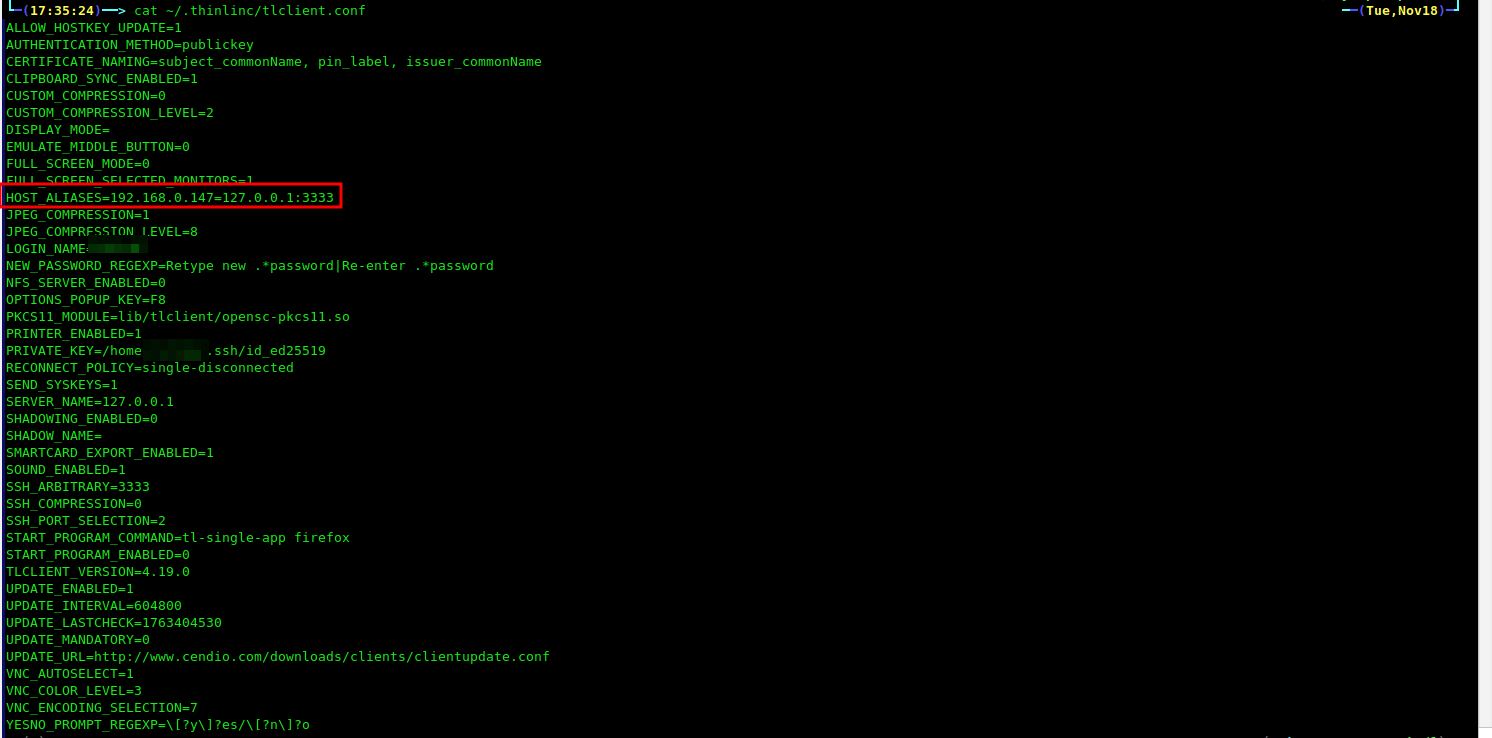
Screenshot of the ~/.thinlinc/tlclient.conf file

Text of the ~/.thinlinc/tlclient.conf file

└─(17:35:24)──> cat ~/.thinlinc/tlclient.conf                                                                                                                          ──(Tue,Nov18)─┘
ALLOW_HOSTKEY_UPDATE=1
AUTHENTICATION_METHOD=publickey
CERTIFICATE_NAMING=subject_commonName, pin_label, issuer_commonName
CLIPBOARD_SYNC_ENABLED=1
CUSTOM_COMPRESSION=0
CUSTOM_COMPRESSION_LEVEL=2
DISPLAY_MODE=
EMULATE_MIDDLE_BUTTON=0
FULL_SCREEN_MODE=0
FULL_SCREEN_SELECTED_MONITORS=1
HOST_ALIASES=192.168.0.147=127.0.0.1:3333
JPEG_COMPRESSION=1
JPEG_COMPRESSION_LEVEL=8
LOGIN_NAME=user
NEW_PASSWORD_REGEXP=Retype new .*password|Re-enter .*password
NFS_SERVER_ENABLED=0
OPTIONS_POPUP_KEY=F8
PKCS11_MODULE=lib/tlclient/opensc-pkcs11.so
PRINTER_ENABLED=1
PRIVATE_KEY=/home/user/.ssh/id_ed25519
RECONNECT_POLICY=single-disconnected
SEND_SYSKEYS=1
SERVER_NAME=127.0.0.1
SHADOWING_ENABLED=0
SHADOW_NAME=
SMARTCARD_EXPORT_ENABLED=1
SOUND_ENABLED=1
SSH_ARBITRARY=3333
SSH_COMPRESSION=0
SSH_PORT_SELECTION=2
START_PROGRAM_COMMAND=tl-single-app firefox
START_PROGRAM_ENABLED=0
TLCLIENT_VERSION=4.19.0
UPDATE_ENABLED=1
UPDATE_INTERVAL=604800
UPDATE_LASTCHECK=1763404530
UPDATE_MANDATORY=0
UPDATE_URL=http://www.cendio.com/downloads/clients/clientupdate.conf
VNC_AUTOSELECT=1
VNC_COLOR_LEVEL=3
VNC_ENCODING_SELECTION=7
YESNO_PROMPT_REGEXP=\[?y\]?es/\[?n\]?o

Client GUI configuration

Starting the connection / entering in the SSH key password

Connection Success!!

Thanks Again!

1 Like

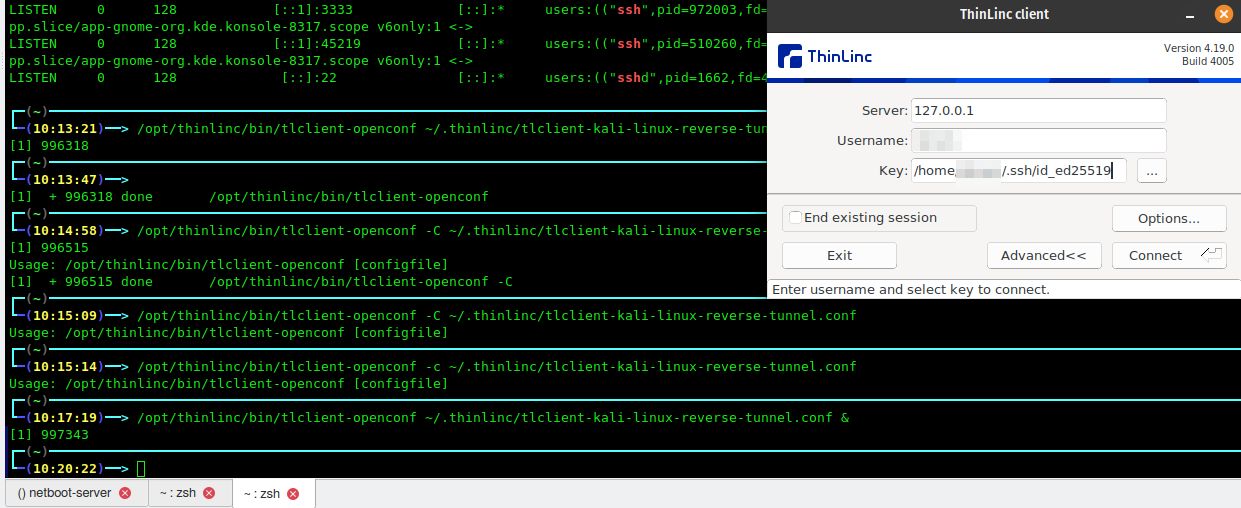
I would imagine that I could also save this as a configuration file with it’s own name and then call it like this

/opt/thinlinc/bin/tlclient-openconf ~/.thinlinc/tlclient-kali-linux-reverse-tunnel.conf &

Yes? No?

Thanks!

Glad to hear you got it working! You can specify a client configuration file at the command line using the -C argument. More info here:

The -C argument does work for me when the client is a Windows system. It does not work for me when the client is a Linux system. The command line I posted above is working for me on a Linux client.

@AnalogKid what is it specifically that doesn’t work on Linux? Could you describe what happens (or doesn’t happen)?

Basic usage failure when using -C or -c

When I don’t use the -C it works just fine

The -C option should be used with tlclient. tlclient-openconf is really just a helper script and shouldn’t normally be called directly.

1 Like

Got it / thank you!

Yes, the -C is working when using that binary.

This says that /opt/thinlinc/bin/ is supposed to be added to the path when the client is installed. I have installed the deb package on Pop!_OS 22.04

NAME=“Pop!_OS”
VERSION=“22.04 LTS”
ID=pop
ID_LIKE=“ubuntu debian”
PRETTY_NAME=“Pop!_OS 22.04 LTS”
VERSION_ID=“22.04”

I am not seeing that in the path.I can add it, but just figured that I would mention that I am not seeing that behavior in my situation.